July 7, 2025
Table of Contents
In the modern world of technology, we often obsess over scaling up - more cores, more micro-services, more buzzwords. After almost two decades of scaling enterprise platforms and delivering MVPs, I have learned that elite teams scale value, not vanity metrics. If a product design cannot grow gracefully, respond quickly, and pay for itself, no amount of code will save it. A few months ago, I put that belief to the test by gut-renovating my personal homelab.
The results?
| Metric | Before | After |
|---|---|---|
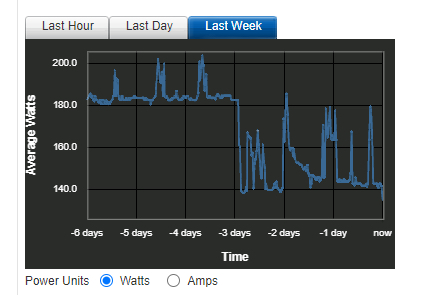
| Power draw (idle) | ~180W | ~140W (-22%) |
| Recovery Time Objective | Hours (manual) | < 1 hour (automated) |
| IaC coverage | Apps only (ArgoCD) | Apps + infra + networking + DNS |
| Data path | Routed through Cloudflare | Fully self-hosted edge |
| Stack complexity | K8s + ArgoCD + Cloudflare | Docker + Terraform + Traefik |
This was not a cosmetic tweak - it was a ground-up rearchitecture driven by first-principles thinking and the ruthless elimination of anything that did not move the needle.
The “Before”: Enterprise-Grade Overhead
My previous architecture was built with enterprise-grade tools - powerful, but wildly overbuilt for a homelab. Classic sledgehammer-meets-nut.
- Kubernetes Cluster inside the NAS: Phenomenal for large-scale distributed systems. Overkill for a homelab. The control plane, networking, and operators demanded constant CPU and RAM. That baseline translated directly into higher power draw.
- ArgoCD for GitOps: A fantastic GitOps workflow ensuring cluster state matched Git. But another resource-hungry layer on top of an already heavy K8s foundation.
- Cloudflare Zero Trust for Ingress: Excellent security and simplified ingress without exposing ports. The trade-off: routing all my traffic through a third-party network, raising data privacy considerations.
Elegant on paper, this setup was a poster child for diminishing returns. The K8s control-plane alone burned ~45W at idle, ArgoCD piled on another container stack, and every third-party dependency introduced a new blast radius.
flowchart
subgraph Internet
    Domain["*.domain.ext"] --> CFZT["Cloudflare Zero Trust"]
end
subgraph Homelab
    subgraph Dell["Dell R520"]
        iDRAC["iDRAC"]
        subgraph Proxmox["Virtualization Host"]
            subgraph NAS["NAS VM"]
                RAID1["RAID1 Array"]
                subgraph K8s["Kubernetes Cluster"]
                    CFT["Cloudflare Tunnel"]
                    ArgoCD["ArgoCD"]
                    Vault["Vault"]
                    GenAI["GenAI"]
                    Others["Apps..."]
                    Kopia["Backup"]
                    CFT --> ArgoCD & Vault & GenAI & Others & Kopia
                end
                ArgoCD & Vault & GenAI & Others & Kopia --> RAID1
            end
        end
    end
    Router --> Dell & iDRAC & Proxmox
end
Proxmox & NAS --> NewRelic((NewRelic))
CFZT <-.-> CFT
Users --> Domain
The “After”: Just Enough
Each component was chosen to perform its function efficiently, nothing more.
Rightsizing Compute: K8s to Docker
The biggest single change. Applications now run as vanilla Docker containers inside a separate VM, managed by Terraform. This move alone delivered the majority of power savings - the system’s idle draw dropped dramatically without K8s overhead.
Evolving IaC: ArgoCD to Terraform Cloud
With K8s gone, a K8s-native tool like ArgoCD no longer fit. I migrated to Terraform Cloud - a strategic shift towards holistic IaC. Terraform defines not just applications, but the entire environment: Proxmox VMs, network configurations, DNS records - all in one place.
Reclaiming the Edge: Cloudflare to Traefik
To replace Cloudflare Zero Trust, I deployed a self-hosted edge stack:
- Traefik Reverse Proxy: Lightweight, auto-discovers containerized services, routes traffic automatically
- Let’s Encrypt Integration: Automatic SSL/TLS certificate management via Traefik’s built-in ACME support
- Google SSO Authentication: Robust multi-factor auth without third-party tunnels - top-tier security with full control over the data path
flowchart
subgraph Homelab
    subgraph Dell["Dell R520"]
        iDRAC["iDRAC"]
        subgraph Proxmox["Virtualization Host"]
            direction LR
            Terraform["Terraform"] --> NAS & Docker
            subgraph NAS["NAS VM"]
                RAID1["RAID1 Array"]
            end
            subgraph Docker["Docker VM"]
                Traefik["Reverse Proxy"]
                Vault["Vault"]
                GenAI["GenAI"]
                Others["Apps..."]
                Kopia["Backup"]
                Traefik --> Vault & GenAI & Others & Kopia
            end
            Vault & GenAI & Others & Kopia --> RAID1
        end
    end
end
Proxmox & NAS & Docker --> Grafana((Grafana Cloud))
Users --> Domain["*.domain.ext"] --> Router --> iDRAC & Traefik
Traefik <-.-> Google((Google SSO))
Key Takeaways
This project was a powerful reminder that “bigger” is not “better.” By critically evaluating my actual needs and choosing tools sized for the job, I ended up with a system that is simpler, faster, cheaper, and genuinely enjoyable to maintain.
- Challenge Your Assumptions. Popular does not equal appropriate. Start with the problem statement, not the tool catalogue.
- Model Total Cost of Ownership. Energy, licenses, cognitive load, incident response - they all end up on your P&L one way or another.
- Optimise for MTTR (Mean Time To Recovery) over Peak Throughput. Most real-world downtime cost sits in recovery, not capacity ceilings.
- Automate the Boring, Not the Rare. Automation debt is real - script only what you touch frequently.
- Default to Simplicity. Fewer moving parts means a tighter security posture and happier on-call rotations.
- Instrument Relentlessly. What gets measured gets improved - and funded.
What cost-saving optimizations have you made in your own lab or infrastructure? I would love to hear your stories in the comments.
Share :
You May Also Like
Fun Things To Do With Self-Hosted Generative AI
Weekend Experiments Weekends are my time to explore. My homelab runs a full generative AI stack - models, workflows, UIs - and I use that freedom to experiment with things that commercial services …
Read More
Unleashing the Power of Collaborative AIs
Beyond the Single Assistant Most AI assistants today function as standalone, generalized models - one brain trying to handle everything from marketing strategy to financial analysis to code review. …
Read More